
Coolmuster Data Recovery2.1.1 - Download
You'll be able to download in few seconds.
Publisher Description
Key Features:
1. Deleted, Formatted, or Inaccessible? Get it All Back Now
It is a robust and reliable data recovery tool to recover more than 550 file formats, including photos, videos, music, docs, emails, .zip, etc. that deleted, formatted, or otherwise inaccessible files in any data loss situations from not only the internal hard drive, but also all kinds of external hard disk.
2. Different Recovery Modes to Satisfy Your Different Recovery Needs
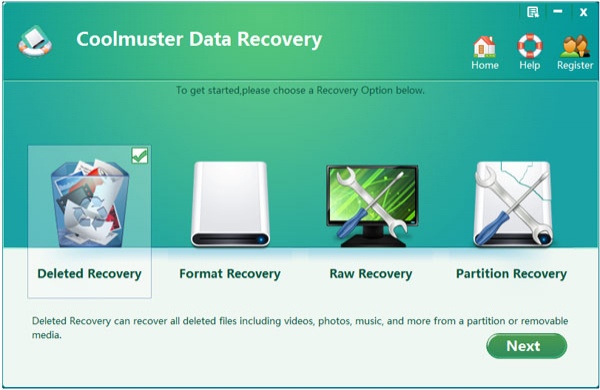
It is no doubt that different people have different recovery needs. So Coolmuster take all your needs into consideration and combine them into one software. And finally release this prominent tool. It provides 4 different recovery modes for your reference: Deleted Recovery, Format Recovery, Raw Recovery and Partition Recovery. According to your own needs to choose the recovery modes, so that you can highly improve your working efficiency.
3. Automatically Scan and Preview Before Recovery
After choosing the recovery modes, the best Data Recovery program will scan your hard disk automatically and display all files on your disk in the left of the panel. Image Preview helps you find your target files and check their properties and quality before you decide to recover them. Preview of documents and archives lets you confirm in advance whether each file is indeed one you want to recover, or not.
4. Recover Not Just from Hard Drives
In addition to computer internal hard drive, this data recovery software also supports to recover from memory card, USB flash drive, MP3/MP4 players, and other removable storage devices. It performs READ-ONLY operations to retrieve and recover your target files to avoid making further damage to your computer and data.
About Coolmuster Data Recovery
This Office Suites & Tools program is available in English. It was last updated on 29 September, 2026. Coolmuster Data Recovery is compatible with the following operating systems: Other, Windows.
The company that develops Coolmuster Data Recovery is Coolmuster Studio. The latest version released by its developer is 2.1.1.
The download we have available for Coolmuster Data Recovery has a file size of 9.4 MB. Just click the green Download button above to start the downloading process. The program is listed on our website since 2013-09-26 and was downloaded 0 times. We have already checked if the download link is safe, however for your own protection we recommend that you scan the downloaded software with your antivirus. Your antivirus may detect the Coolmuster Data Recovery as malware if the download link is broken.
How to install Coolmuster Data Recovery on your Windows device:
- Click on the Download button on our website. This will start the download from the website of the developer.
- Once the Coolmuster Data Recovery is downloaded click on it to start the setup process (assuming you are on a desktop computer).
- When the installation is finished you should be able to see and run the program.
Program Details
System requirements
Download information
Pricing
Version History
version 2.1.1
posted on 2013-09-26
Restore lost, deleted or formatted data from computer hard drive, SD card, etc;
Disclaimer
External Download
We do not host Coolmuster Data Recovery on our servers. We did not scan it for viruses, adware, spyware or other type of malware. This app is hosted by the software publisher and passed their terms and conditions to be listed there. We recommend caution when installing it.
The external download link for Coolmuster Data Recovery is provided to you by apps112.com without any warranties, representations or guarantees of any kind, so access it at your own risk.
If you have questions regarding this particular app contact the publisher directly. For questions about the functionalities of apps112.com contact us.
